At a Glance
- Mi


Some of the most important organizational data is quickly being migrated to the cloud (see the chart below - storage onprem vs cloud). The initial reluctance and concerns over data privacy and security in the cloud are now replaced by the need to optimize IT operations and keep costs in check.
Did the pendulum swing too far? Aren't organizations too lightheartedly trust their sensitive data to cloud providers?
In this blog post we will look at if and how businesses check their vendors and what are the key factors you should be concerned about when assessing cloud vendors like Microsoft 365 backup service providers, cloud ERP/CRM systems, and others.
Using a cloud vendor with inadequate security controls significantly increases your cybersecurity risks – your data may be stolen, permanently lost or unavailable when you need it.
Despite significant risks, however, trust is the most important (and often the only) factor in customer relationships with their cloud providers.
As many as 90% of organizations rely on vendor marketing claims when selecting cloud services and performing vendor risk assessments. Less than 10% of companies require audit reports to work with a new cloud provider, and only 0.1% perform security audits themselves.
Most organizations rely on cloud provider marketing materials and product documentation; only ~10% require security audit
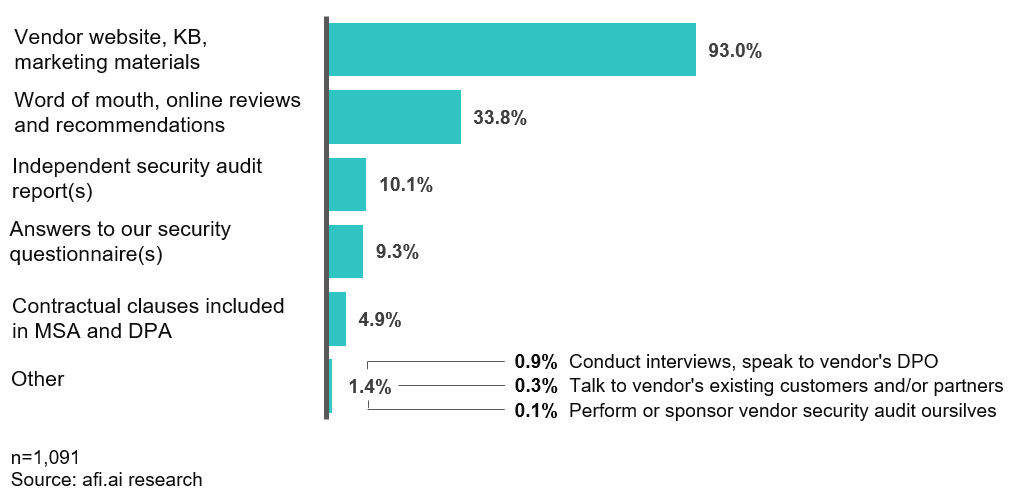
These results are based on our experience as well as three other vendors selling management services for Microsoft 365 and Exchange Online. Our (afi.ai) key products include backup for Microsoft 365 and Google Workspace that usually contain some of the most critical and sensitive data.
It is likely that organizations are even less thorough when adding new cloud vendors that work with less critical (but still important) information - for example marketing management systems (contain customer personal data) or financial software (contain sensitive tax & accounting data).
Because we protect some of the most sensitive and important data, we are subject to many vendor risk assessments. In this article we’d like to share the experience of how customers can evaluate cloud vendors’ security, what are the main risks related to cloud providers and what are the best security practices employed by vendors.
In most cases customers cannot directly observe and measure the cloud vendor security controls. As a customer you need to collect evidence that will let you assess prospective vendors’ security indirectly.
There are 3 main areas that help customers make informed decisions about their vendor security controls and ensure compliance:
First of all, you should request results of independent security audits and carefully review them. Two major security certifications for cloud providers are SOC 2 and ISO 27001 – both have very similar audit scope and describe vendor security controls.
Below we’ll shortly describe the audit process and requirements for SOC 2. In most respects ISO 27001 follows the same principles, and while SOC 2 is used more frequently in North America, ISO 27001 is historically used by companies in Europe.
As part of SOC 2 security audit, independent auditors review vendors’ processes and technology stack. The review consists of on-site and remote interviews, analysis of system logs and/or screensharing sessions. In 2020 we (Afi) completed a SOC 2 Type II audit cycle, and as part of the process:
SOC 2 audit is performed by audit firms specialized in internal controls, IT assurance and computer systems (Afi’s auditor is Linford & Company LLP). The audit procedures themselves are regulated by American Institute of Certified Public Accountants (AICPA), the same non-for-profit organization that sets generally accepted accounting principles in the US.
Unlike SOC 2 and ISO 27001, many other privacy and security designations (e.g. GDPR, CCPA or HIPAA) have self-certification options whereas cloud vendors perform self-assessments and declare compliance without external auditors.
Such certifications are easier to obtain, but provide less assurance of vendor security controls since no independent analysis of cloud provider security controls is performed.
Few customers have enough resources and bargaining power to perform full audits of their cloud providers. Nevertheless, organizations should use the trial/POC access to the cloud product to test vendor claims and verify information about their products.
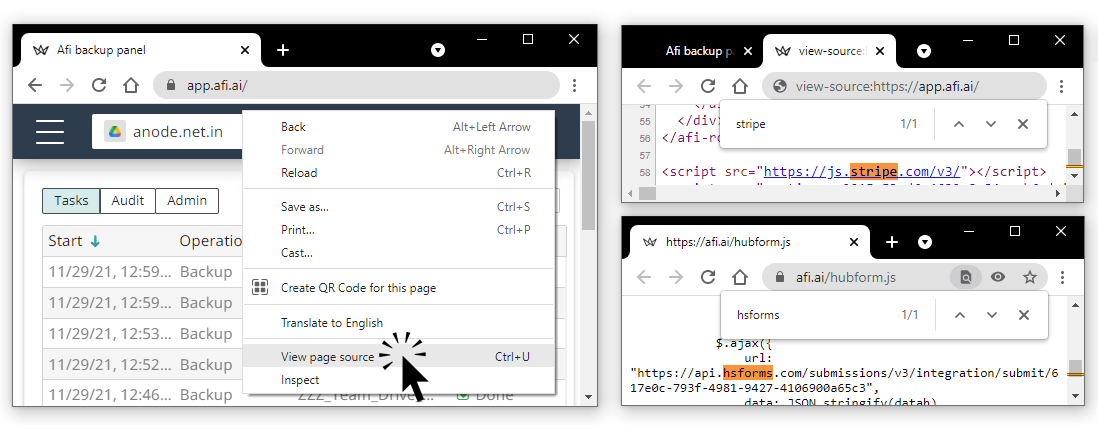
You can use access to the cloud application to learn more about vendor technology stack. Most cloud services provide web-based access, and you can review references within the code to check what third-party systems are used in the application (if you use Google Chrome, select View page source option in the context menu).
In the example below, you can see that Afi application includes Stripe, a subscription management and billing provider, as well as HubSpot. Knowing this, you can examine Afi security and compliance page and check if the two services are disclosed in the list of the sub-processors, and how Afi uses them.
You can also check the web application IP address to learn where it is hosted. In the example below we used Windows command line to ping app.afi.ai and find out its IP address. Next, we checked search.arin.net to get details about the IP address. The details show that the IP address belongs to Google Cloud Platform (Afi is hosted in Google Cloud, as described in our documentation).
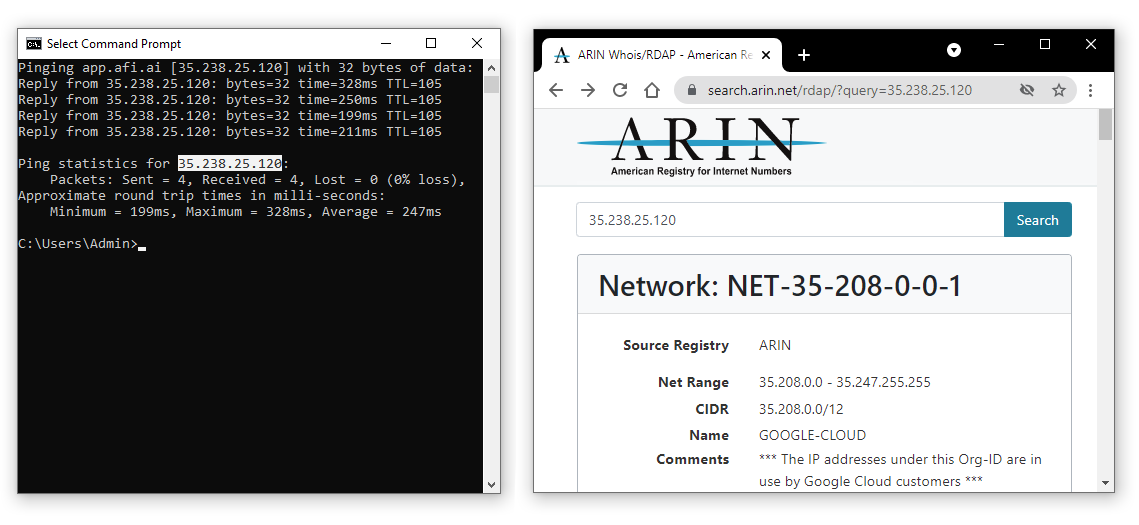
The DIY analysis will not reveal all sub-processors used by the vendor, since most cloud service components are not visible on the front-end. However the investigation helps raise important red flags if you discover details that contradict the vendor marketing claims or documentation.
You can use the trial/POC period to test cloud service customer-facing security features such as audit log or . Aside from enabling customers to leverage the security features, cloud provider's willingness to develop them serves as indirect evidence of their commitment to strong security controls.
Different types of cloud providers warrant different levels of security - for example a cloud events management app contains less critical data than Microsoft 365 or Google Workspace platforms, and the latter will require more granular access control, data leak prevention.
Afi stores some of the most valuable data. Based on our experience:
2FA
Integrations – Okta, Azure AD
Roles, access controls
Audit log
If a vendor claims anti-ransomware capabilities, test them
Questionnaires / interviews
Most customers rely on security questionnaires and interviews when assessing their cloud vendors. The data requests help organizations understand policies, suppliers and technologies used by the cloud providers.
There are vendors that help automate the process, however the process must not be too much focused on the paperwork – instead of 1000 questionnaire items filled by vendor sales people who just copy answers to standard questions, it’s better to talk to the security officer and interview technical team rather than limiting your communication to sales guys.
Key questions to address: Encryption, data residency,
Afi is compliant with SOC 2 and is audited on an annual basis. Please check our SOC 3 report here (you can also request SOC 2 Type 2 report after you sign an NDA). In this
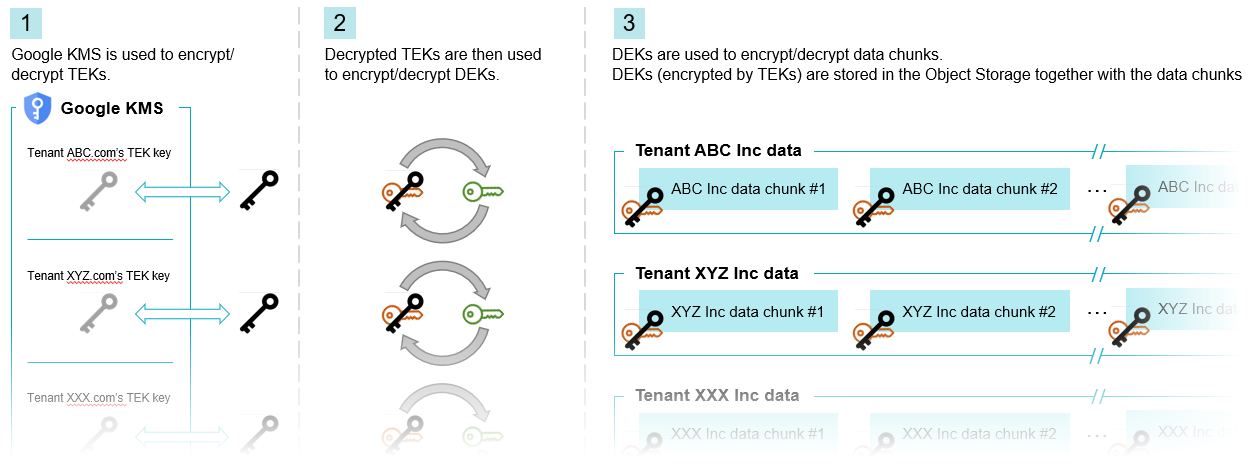
Afi encryption follows recommendations from NIST SP 800-57 Part 1 Rev. 5 cryptographic key-management guidance and Google Cloud security best practices guides. All customer data (backed up items and metadata) is encrypted in transit and at rest, while the 3-lever hierarchy of keys effectively isolates tenants (customers) and different parts of organizations within one tenant:
x
Use a combination of evidence collection – certifications + first-hand analysis.
what to avoid Legacy tech, poor experience, weak documentation, not transparent.
Standards may be different depending on the type of service. Vendors that access and store customers’ sensitive data, such as office suites, cloud storage and backup vendors, often represent the highest level of security risk because of the amount of critical business and personal information they manage.
O365 Backup Tools Comparison
Microsoft Teams Backup Options