Afi Microsoft 365 application permissions
This article explains the Microsoft 365 permissions requested by the Afi application and how Afi uses them for backup, recovery, resource discovery, and authentication.
Most backup and recovery operations use application permissions with certificate-based authentication, so Afi does not rely on any specific user or administrator account to access Microsoft 365 data, except for Power BI and Power Platform backup. The delegated permissions listed in the final section are used only for interactive user authentication and session management.
Backup and recovery permissions
Mail, calendar, contacts, and tasks
These permissions are requested by Afi to back up and recover mail, calendars, contacts, and Microsoft To Do tasks.
| Permission | Workload | Activity |
|---|---|---|
Mail.ReadWrite |
Exchange mail | Back up and restore messages, folders, attachments, and mail metadata through Microsoft Graph. |
full_access_as_app |
Exchange mail | Back up In-Place (Online) Archive mailboxes. |
Calendars.ReadWrite |
Calendar | Back up and restore calendars, events, attachments, and related metadata. |
Contacts.ReadWrite |
Contacts | Back up and restore contact folders, contacts, and related metadata. |
Tasks.ReadWrite.All |
Microsoft To Do Tasks | Back up and restore task lists, tasks, and related metadata. |
People.Read.All |
Contact enrichment | Read relevant-people information used for user and contact identity, recipient, and related metadata. |
Info
Microsoft is retiring Exchange Web Services (EWS) in Exchange Online. The retirement will start on Oct 1, 2026 and can be postponed until Apr 1, 2027 by explicitly allowing EWS for your Microsoft 365 tenant and making sure that the Afi application ID is included in the EWS allow list.
The full_access_as_app permission is used only for In-Place (Online) Archive backup, which remains on EWS while a generally available Graph API for archive mailbox access is unavailable. Afi uses Graph API for all other Exchange-related workloads.
To keep protecting In-place (Online) Archive data after Oct 1, 2026, follow instructions in this section.
OneDrive and SharePoint
These permissions are requested by Afi to discover, back up, and recover OneDrive and SharePoint data.
| Permission | Workload | Activity |
|---|---|---|
Files.ReadWrite.All |
OneDrive | Read drive structure and file content, and create or update files and folders during recovery. |
Sites.FullControl.All |
SharePoint and OneDrive | Access sites, lists, drives, site users, permissions, and related resources for backup, recovery, and discovery. |
Teams channels and teams
These permissions are requested by Afi to back up and recover Teams channels and teams.
| Permission | Activity |
|---|---|
ChannelMessage.Read.All |
Back up channel posts, replies, hosted content, and message metadata. |
ChannelMember.ReadWrite.All |
Back up channel membership. |
ChannelSettings.ReadWrite.All |
Back up and restore channel metadata. |
TeamMember.ReadWrite.All |
Back up team membership and restore members and owners. |
TeamSettings.ReadWrite.All |
Back up and restore team properties and settings. |
Teamwork.Migrate.All |
Import historical channel and chat messages with their original sender and timestamp during recovery. |
Group.ReadWrite.All |
Read and restore the Microsoft 365 group associated with a team, including group membership and ownership. |
Member.Read.Hidden |
Include hidden membership that ordinary group-member permissions can omit. |
Files.ReadWrite.All |
Back up and restore Teams files and message attachments stored in SharePoint or OneDrive. |
Sites.FullControl.All |
Access the SharePoint site associated with a team. |
Teams private and group chats
These permissions are requested by Afi to back up and recover Teams private and group chats.
| Permission | Activity |
|---|---|
Chat.ReadWrite.All |
List chats, chat members, and messages. |
Files.ReadWrite.All |
Retrieve file-backed chat attachments. |
User.ReadWrite.All |
Resolve chat participants to tenant users. |
Group mailboxes
These permissions are requested by Afi to back up Microsoft 365 Group mailboxes.
| Permission | Workload | Activity |
|---|---|---|
Group.ReadWrite.All |
Microsoft 365 Group mailboxes | Back up group mailbox conversations, threads, and posts. |
Planner
These permissions are requested by Afi to back up and recover Microsoft Planner.
| Permission | Workload | Activity |
|---|---|---|
Group.ReadWrite.All |
Planner | Locate group-owned plans and support recovery of group-backed Planner data. |
Tasks.ReadWrite.All |
Planner | Read and restore plans, buckets, tasks, task details, and related data. |
User.ReadWrite.All |
Planner identity resolution | Resolve users assigned to Planner tasks. |
Entra ID and Intune configuration
These permissions are requested by Afi to back up Entra ID and Intune configuration and recover Entra ID data.
| Permission | Purpose | Activity |
|---|---|---|
Directory.ReadWrite.AllUser.ReadWrite.AllGroup.ReadWrite.AllMember.Read.Hidden
|
Users and groups | Back up and restore users, groups, membership, ownership, and directory relationships. |
MailboxSettings.ReadWrite |
Mailbox settings | Determine mailbox resource type and back up and restore user mailbox settings. |
AdministrativeUnit.ReadWrite.All |
Administrative units | Back up and restore administrative units, scoped membership, and related user and group associations. |
Application.ReadWrite.All |
Applications | Back up application registrations and enterprise applications (service principals). |
RoleManagement.ReadWrite.Directory |
Roles and role-based access control | Back up and restore role definitions and assignments. |
Policy.Read.AllPolicy.ReadWrite.ConditionalAccess
|
Conditional Access | Back up and restore conditional access policies, named locations, authentication strengths, and authentication contexts. |
AuditLog.Read.All |
Audit data | Back up audit and sign-in log data. |
BitlockerKey.Read.All |
BitLocker | Back up device BitLocker recovery-key information. |
DeviceManagementConfiguration.ReadWrite.AllDeviceManagementRBAC.ReadWrite.All
|
Intune configuration | Back up Intune configuration policies and related configuration objects. |
Copilot
These permissions are requested by Afi to back up Microsoft 365 Copilot interactions.
| Permission | Activity |
|---|---|
AiEnterpriseInteraction.Read.All |
Back up Microsoft 365 Copilot enterprise interaction history for users. |
Service permissions
Resource discovery, sizing, and ownership
These permissions are requested by Afi to discover Microsoft 365 resources, determine ownership, and estimate tenant storage usage.
During resource discovery, Afi performs read operations only.
| Permission | Activity |
|---|---|
Directory.ReadWrite.All |
List tenant organization details, domains, users, groups, directory roles, memberships, and account metadata. |
User.ReadWrite.All |
Enumerate users, photos, account metadata, licenses, service plans, and mailbox-backed resources. |
Group.ReadWrite.All |
List groups, nested members, and owners, and associate Microsoft 365 groups with Teams and sites. |
Member.Read.Hidden |
Include hidden group members when determining resource ownership and protection assignments. |
MailboxSettings.ReadWrite |
Determine whether an account represents a user, shared mailbox, or room mailbox. |
Reports.Read.All |
Retrieve mailbox and SharePoint usage reports to estimate tenant storage usage. |
Sites.FullControl.All |
Enumerate sites and multi-geo regions and inspect site users to determine shared-resource ownership. |
Authentication and session permissions
These permissions are requested by Afi to authenticate users and maintain their sessions when they access the Afi portal.
| Permission | Type | Purpose |
|---|---|---|
openid |
Delegated | Establish an OpenID Connect user identity during interactive authorization. |
profile |
Delegated | Obtain the consenting user's basic identity and profile claims. |
email |
Delegated | Obtain the consenting user's email claim. |
offline_access |
Delegated | Maintain authorization beyond the initial interactive session. |
These delegated permissions are not workload backup permissions and do not authorize app-only access to tenant data. They do not require administrator consent. Production backup and recovery operations principally use application permissions and certificate-based authentication, except for Power BI and Power Platform backup, which uses delegated permissions.
How to uninstall the Afi application
To uninstall the Afi application and revoke its access to your Microsoft 365 tenant:
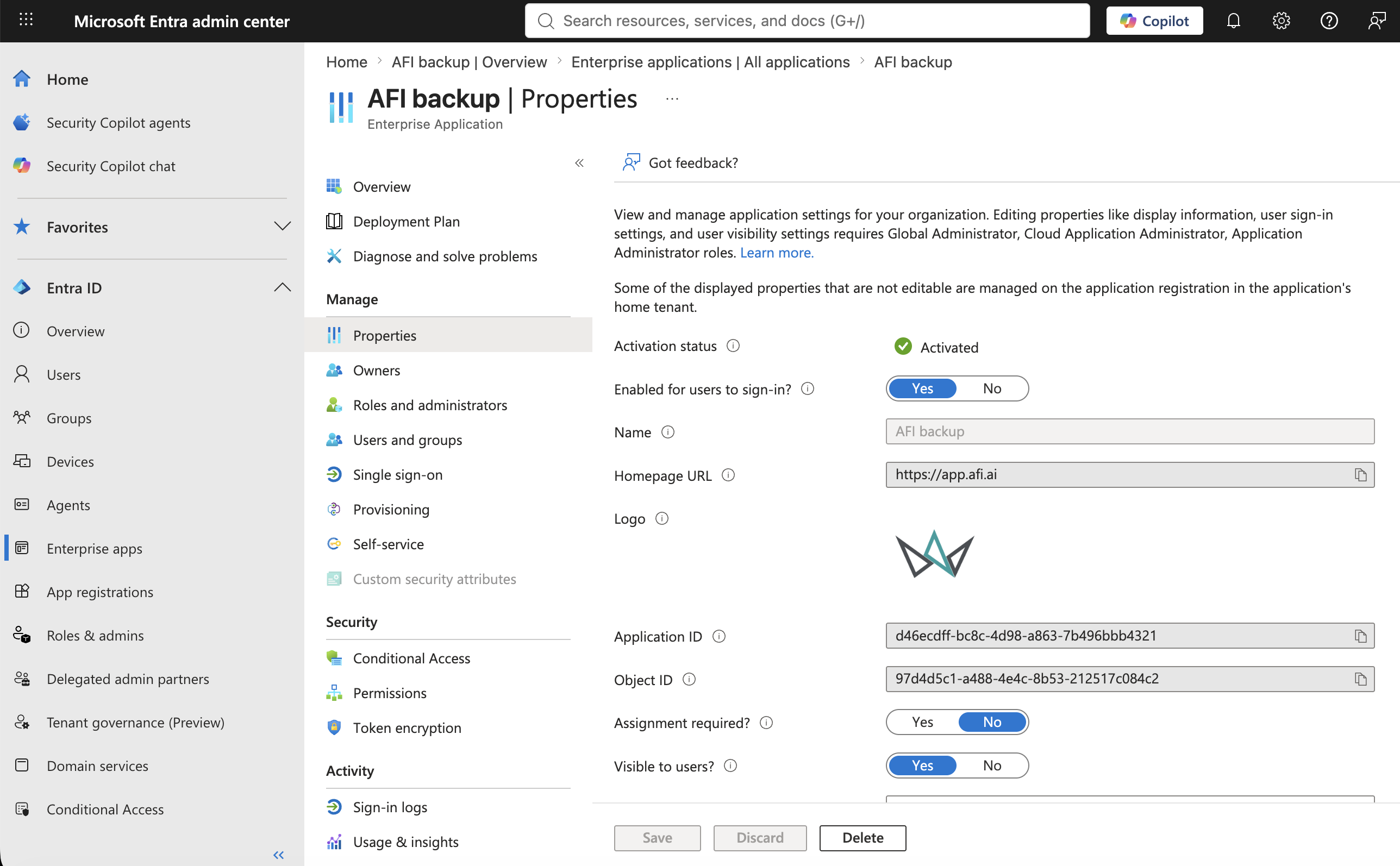
- Sign in to the Microsoft Entra admin center using an administrator account that can manage enterprise applications.
- Go to Entra ID → Enterprise apps → All applications, then select AFI backup.
- Select Properties, click Delete at the bottom of the page, and confirm the deletion.